📒 ReqMd
Welcome to the ReqMd documentation! These docs are aimed at explaining the
format specification, tools available, and structure of the codebase. The menu
navigation can take you to these different topics. I hope you find the
information you’re looking for, but, if you don’t please feel free to post in
the discussions on Github with your question.
🎇 Inspiration
While pair-programming in 2019 a colleague demonstrated this fantastic VS Code
plugin which parsed HTTP requests in a special file format. These requests could
be sent and the results displayed back directly from the editor. I have always
been a staunch user of Vim and Neovim so I set out looking for a similar plugin
for my editor of choice with minimal luck. As I was learning Rust back then I
decided to cut my teeth on building a similar tool and req_md was born. My
appreciation for markdown’s simplicity and extendibility is why I opted to use
it as the host format.
📐 ReqMd Markdown Format
ReqMd is designed to leverage already existing markdown features and conventions as much as possible. This means that ReqMd documents are valid to render in any other context. This also means that ReqMd documents can be rendered in any system and will gracefully degrade if the system does not support all of the ReqMd features.
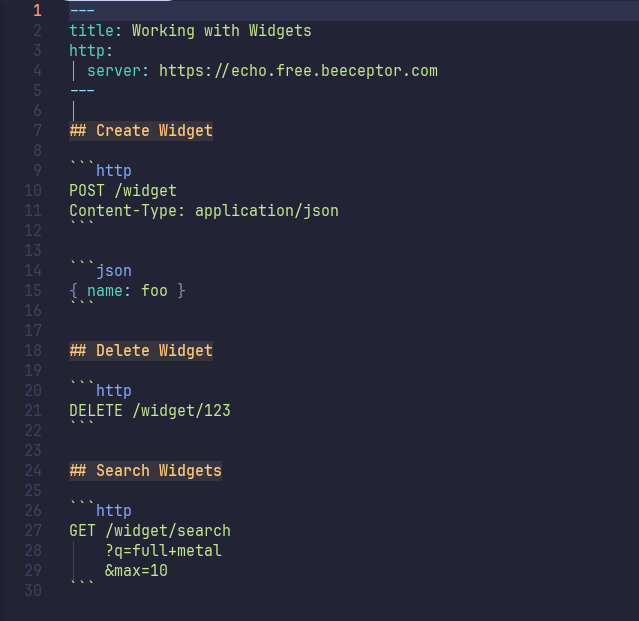
This example highlights a sample document which can be downloaded from the assets directory. The top of the document is a header following the front matter convention and describes the server to send requests to. After this section are three HTTP sections showcasing some of the requests that can be fashioned.
---
title: Working with Widgets
http:
  server: https://echo.free.beeceptor.com
---

## Create Widget

```http
POST /widget
Content-Type: application/json
```

```json
{ "name": "foo" }
```

## Delete Widget

```http
DELETE /widget/123
```

## Search Widgets

```http
GET /widget/search
    ?q=full+metal
    &max=10
```
For more details on the format see the following pages:
🔎 Front Matter
🔬 Details
Front matter is an extension to markdown which provides metadata information
to a document that is not intended to be directly rendered. It is a YAML
encoded hash at the very top of the document that is sandwiched between sets
of ---. ReqMd leverages this extension to extract the following three data
points:
title- Optional string attached to the AST metadata which is expected
to be a short, single line identification of the document. If
not provided this defaults to
nullin JSON orNonein Rust if using the respective libraries. description- Optional string attached to the AST metadata which can be multiple
lines long an is a synopsis of the document. If not provided this
defaults to
nullin JSON orNonejust like the title. http- Optional hash structure which provides default values to all http
requests defined in the same document. This hash has itself three
keys all of which are optional:
server,headers, andquery; each of which is described below ashttp.{key}. http.server- This is an URL encoded string which is the base of a HTTP address.
This includes either
httporhttps, the DNS or IP address, and optional port number. Example:https://example.com:8080. This defaults tohttp://localhostif not provided. http.headers- An array of hashes with two keys of
keyandvalue. This is an array to allow for multiple headers with the same key to be defined should you need to do so. Defaults to an empty array if not provided. http.query- Similar to headers, this is an array of hashes with two keys of
keyandvalue. Also just like the headers this defaults to an empty array if not provided.
📖 Markdown Example
---
title: Example ReqMd Document
description: |
  This is an example of a ReqMd document with front matter.  The
  description field can be multiple lines long and is a synopsis
  of the document.
http:
  server: https://example.com:8080
  headers:
    - key: Content-Type
      value: application/json
    - key: Accept
      value: application/json
  query:
    - key: foo
      value: bar
---
🌐 HTTP Requests
🔬 Details
Requests are defined in markdown code blocks with the language tag of http.
These code blocks do not strictly follow the HTTP specification but are instead
a more flexible format that is more readable and writable by humans. The start
of the code block is the method and path of the request. The method is one of
the standard HTTP methods such as GET, POST, PUT, etc. The path is the
string that comes after the server in a URL. This can include query parameters
and this is where the format deviates from the standard HTTP specification.
Each query parameter can be on it’s own line and they can be separated by either
? or &. Neither the key or value parts of the query parameters need to be
URL encoded. The rest of the code block is the headers of the request. These
are in the standard HTTP format of Key: Value and can be as many as needed.
Body content is defined in a separate code block as long as the language tag is
not http. It is important to note that nothing but white exists between the
two code blocks. This is to allow for the body content to be in any format but
still be associated with the request. The language tag of the body content is
to allow for syntax highlighting and is not used by ReqMd for any other purpose.
In addition to this in the AST there is a title and description. These are
both optional and are identified by the first header found above the http
code block. Any content between this header and the code block is considered
to be the description. The title is the content of the header itself. If no
text is found between the header and the code block then the description is
null in JSON or None in Rust.
📖 Markdown Example
## Title of the Request

This is the description of the request.  It can be multiple lines long and
have **any** of the standard markdown formatting.  It is preserved exactly
as it is in the source as a string in the AST metadata.

```http
POST /widgets?foo=bar
             &fizz=buzz
Content-Type: application/json
```

```json
{
  "name": "XFox",
  "desc": "Wonderful widget!"
}
```
🖥️ reqmd CLI
reqmd is a terminal application which acts as both a parser of
properly formatted documents and a runner of the HTTP requests
contained within those documents. This tool is designed to be
used in a variety of ways, from a simple http client to a more
complex part of a CI/CD pipeline, and also serves as a reference
implementation for API documentation written in the ReqMd format.
The tl;dr is to be able to take a document like this:
Sample document:
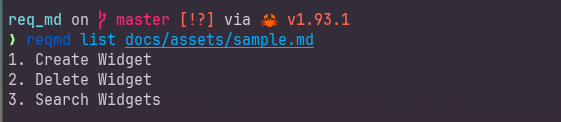
And run commands like this:
List requests found in the document:
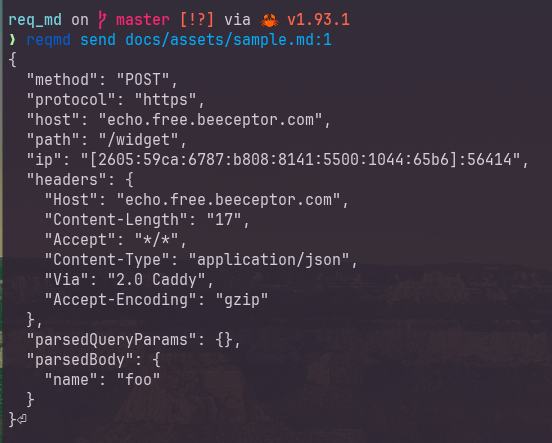
Note
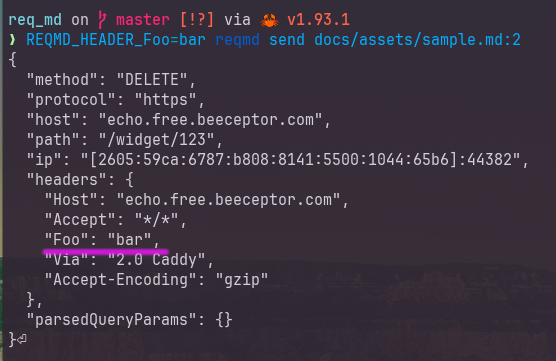
The server in the example is an echo server that replies with the information it was sent. What you are seeing returned is the response of that echo server. This helps demonstrate what the details were in the requests this tool sent.
Send first request in the document:
Adds header to request with environment variable:
Can set timeouts ( Examples: 50ms, 2sec, 5min )

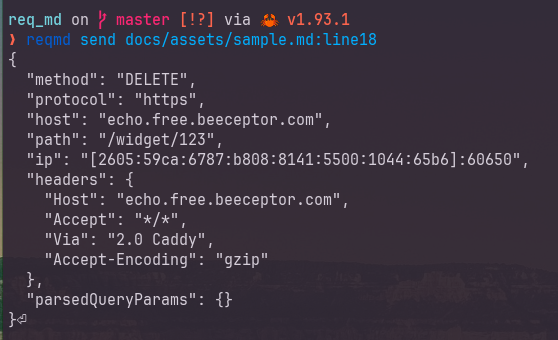
Run by request found at a line number:
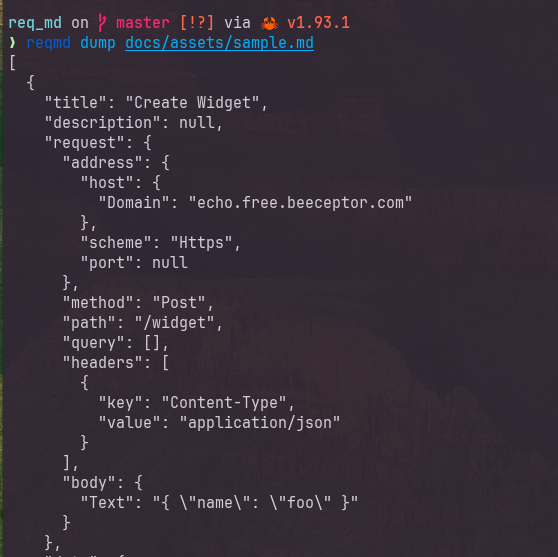
Dump requests to JSON:
🕹️ Commands
Note
For every example that follows the sample.md document was used for input. Refer to it for more context or try out the examples for yourself.
❓ reqmd help
Produces the following output:
Tool for sending HTTP requests defined in markdown files

Usage: reqmd <COMMAND>

Commands:
  list  Lists all of the requests found in order
  send  Sends request from file to server
  dump  Outputs JSON representation of parsed requests
  help  Print this message or the help of the given subcommand(s)

Options:
  -h, --help     Print help
  -V, --version  Print version
📝 reqmd list
Parses a document and lists all of the requests found in order. If the request has a matching header it is displayed in the list; however, if none is found the request line is used instead.
reqmd list docs/assets/sample.md
1. Create Widget
2. Delete Widget
3. Search Widgets
🚀 reqmd send
Sends specified request from file to server. This main parameter is the filename followed by a colon and a selection identifier. Currently the selection identifiers are:
:{n}wherenis a 1-based index of the request from the file:firstthe first found request, same as:1:lastthe last request in the document.:line{n}wherenis a 1-based line number of the document. The request that contains this line number is selected.
The response is printed back as long as the value is valid UTF-8.
📖 Second Request
reqmd send docs/assets/sample.md:2
{
  "method": "DELETE",
  "protocol": "https",
  "host": "echo.free.beeceptor.com",
  "path": "/widget/123",
  "ip": "[2605:59ca:6787:b808:8141:5500:1044:65b6]:40516",
  "headers": {
    "Host": "echo.free.beeceptor.com",
    "Accept": "*/*",
    "Via": "2.0 Caddy",
    "Accept-Encoding": "gzip"
  },
  "parsedQueryParams": {}
}
📖 Last Request
reqmd send docs/assets/sample.md:last
{
  "method": "GET",
  "protocol": "https",
  "host": "echo.free.beeceptor.com",
  "path": "/widget/search?q=full%2Bmetal&max=10",
  "ip": "[2605:59ca:6787:b808:8141:5500:1044:65b6]:41236",
  "headers": {
    "Host": "echo.free.beeceptor.com",
    "Accept": "*/*",
    "Via": "2.0 Caddy",
    "Accept-Encoding": "gzip"
  },
  "parsedQueryParams": {
    "q": "full+metal",
    "max": "10"
  }
}
📖 On Line 10
reqmd send docs/assets/sample.md:line10
{
  "method": "POST",
  "protocol": "https",
  "host": "echo.free.beeceptor.com",
  "path": "/widget",
  "ip": "[2605:59ca:6787:b808:8141:5500:1044:65b6]:56286",
  "headers": {
    "Host": "echo.free.beeceptor.com",
    "Content-Length": "17",
    "Accept": "*/*",
    "Content-Type": "application/json",
    "Via": "2.0 Caddy",
    "Accept-Encoding": "gzip"
  },
  "parsedQueryParams": {},
  "parsedBody": {
    "name": "foo"
  }
}
⚙️ reqmd dump
Returns a JSON representation of the parsed requests from the document for other tools to consume.
reqmd dump docs/assets/sample.md
[
  {
    "title": "Create Widget",
    "description": null,
    "request": {
      "address": {
        "host": {
          "Domain": "echo.free.beeceptor.com"
        },
        "scheme": "Https",
        "port": null
      },
      "method": "Post",
      "path": "/widget",
      "query": [],
      "headers": [
        {
          "key": "Content-Type",
          "value": "application/json"
        }
      ],
      "body": {
        "Text": "{ \"name\": \"foo\" }"
      }
    },
    "data": {
      "title": "Create Widget",
      "description": null,
      "method": "Post",
      "path": "/widget",
      "query": [],
      "headers": [
        {
          "key": "Content-Type",
          "value": "application/json"
        }
      ],
      "body": {
        "content": {
          "Text": "{ \"name\": \"foo\" }"
        },
        "lang": "json",
        "meta": null,
        "position": {
          "start": {
            "line": 14,
            "column": 1,
            "offset": 160
          },
          "end": {
            "line": 16,
            "column": 4,
            "offset": 189
          }
        }
      },
      "position": {
        "start": {
          "line": 7,
          "column": 1,
          "offset": 85
        },
        "end": {
          "line": 16,
          "column": 4,
          "offset": 189
        }
      }
    }
  },
  {
    "title": "Delete Widget",
    "description": null,
    "request": {
      "address": {
        "host": {
          "Domain": "echo.free.beeceptor.com"
        },
        "scheme": "Https",
        "port": null
      },
      "method": "Delete",
      "path": "/widget/123",
      "query": [],
      "headers": [],
      "body": "None"
    },
    "data": {
      "title": "Delete Widget",
      "description": null,
      "method": "Delete",
      "path": "/widget/123",
      "query": [],
      "headers": [],
      "body": {
        "content": "None",
        "lang": null,
        "meta": null,
        "position": null
      },
      "position": {
        "start": {
          "line": 18,
          "column": 1,
          "offset": 191
        },
        "end": {
          "line": 22,
          "column": 4,
          "offset": 239
        }
      }
    }
  },
  {
    "title": "Search Widgets",
    "description": null,
    "request": {
      "address": {
        "host": {
          "Domain": "echo.free.beeceptor.com"
        },
        "scheme": "Https",
        "port": null
      },
      "method": "Get",
      "path": "/widget/search",
      "query": [
        {
          "key": "q",
          "value": "full+metal"
        },
        {
          "key": "max",
          "value": "10"
        }
      ],
      "headers": [],
      "body": "None"
    },
    "data": {
      "title": "Search Widgets",
      "description": null,
      "method": "Get",
      "path": "/widget/search",
      "query": [
        {
          "key": "q",
          "value": "full+metal"
        },
        {
          "key": "max",
          "value": "10"
        }
      ],
      "headers": [],
      "body": {
        "content": "None",
        "lang": null,
        "meta": null,
        "position": null
      },
      "position": {
        "start": {
          "line": 24,
          "column": 1,
          "offset": 241
        },
        "end": {
          "line": 30,
          "column": 4,
          "offset": 320
        }
      }
    }
  }
]
🔌 Builtin Plugins
The core of reqmd supports extending how it parses markdown documents
and this CLI enables several that ship with the library. In no particular
order, these include:
- Env Var Overrides & Additions
- Env Var Substitution
- YAML Body to JSON Body Conversion
When reqmd is run it will attempt to load a .env file from the current
working directory and apply any variables defined there as environment
variables for plugins.
🎛️ ENV Var HTTP Settings
In addition to the front matter of a markdown document, reqmd allows for
you to supply environment variables which will apply to all requests parsed.
-
REQMD_SERVERIf set, this will override the server URL for all requests in the document.
-
REQMD_QUERY_{parm}For each environment variable that starts with
REQMD_QUERY_, the remainder of the variable name will be used as a query parameter name and the value of the variable will be used as the value for that query parameter. As an example, the query parameter?foo=barcan be set for all requests in the document withREQMD_QUERY_foo=bar. -
REQMD_HEADER_{header}For each environment variable that starts with
REQMD_HEADER_, the remainder of the variable name will be used as a header name and the value of the variable will be used as the value for that header. As an example, the headerFoo: barcan be set for all requests in the document withREQMD_HEADER_Foo=bar.
🔃 ENV Var Substitution
As the headers, query parameters, and body of a request are parsed, any value
that starts with $ will be substituted with a variable from the environment.
If an environment variable is not found the dollar sign and name are left
as-is.
🫂 YAML to JSON Body
Sometimes it can be easier to write request bodies in YAML format, but the API
you are working with may only accept JSON. If the body of a request is marked
with a language tag of yml or yaml and has a meta tag of send-as-json the
body will be parsed as YAML and then converted to JSON before being sent.
🌐 Server from Host Header
Provides a way to specify the server at each request by using the Host
header. If the Host header is present in a request, its value will be used
as if it was the server spcified in the front matter of the document. The
Host header is then updated to contain only the host portion to maintain
http compliance with the header format.
Host: https://example.combecomes:
Host: example.com
📥 Install reqmd
🪟 Windows Installer
Download Windows Installer from latest release:
🔗 v0.2.1/reqmd_cli-x86_64-pc-windows-msvc.msi
🐚 Powershell One Liner
Install pre-built binary for Windows with PowerShell one liner:
powershell -ExecutionPolicy Bypass -c "irm https://github.com/benfalk/req_md/releases/download/v0.2.1/reqmd_cli-installer.ps1 | iex"
🖥️ Linux/MacOS One Liner
Install pre-built binaries for Linux and MacOS with shell one liner:
curl --proto '=https' --tlsv1.2 -LsSf https://github.com/benfalk/req_md/releases/download/v0.2.1/reqmd_cli-installer.sh | sh
🦀 With cargo install
Downloads latest source code from crates.io and compiles it locally
cargo install reqmd_cli
🦀 With cargo binstall
Install pre-built binaries for popular platforms
cargo binstall reqmd_cli
🦀 From Source
To install from source you will need the rust compiler tool-chain. If you don’t have it installed, you can get it from rustup.rs. You will also need git to fetch the source code. Probably the biggest benefit from installing from source is you can get the latest features and bug fixes without waiting for a release.
1. git clone
git clone https://github.com/benfalk/req_md.git
2. cargo install
cargo install --path=req_md/crates/reqmd_cli
🌐 Pre-Built Binaries
All possible binaries for popular platforms are available for download along with their respective checksums. Source for most of the solutions that are above.
🛠️ Development Setup
-
Clone the repository
git clone https://github.com/benfalk/req_md.git -
Setup local development environment
- If you have
justinstalled:
just dev-setup- If you don’t have
justinstalled (installsjustas well):
./scripts/setup-dev-env.sh - If you have
-
Available Justfile Recipes
default                # lists all recipes
menu                   # launch interactive menu

[build]
build                  # Builds all crates in the workspace
build-install-cli      # Installs the CLI reqmd
build-install-tui      # Installs experimental TUI reqmd_tui
build-rust-docs        # Builds and opens rust crate documentation

[dev]
dev-book               # mdbook documentation with hot reloading
dev-cli COMMAND *ARGS  # Runs dev CLI, rebuilding when needed
dev-setup              # Setup environment for development
dev-tui *ARGS          # Runs dev TUI, rebuilding when needed

[test]
test *TEST_CASES       # runs quick tests or specific functions
test-all               # runs all tests, including publish checks
test-doc-gen           # souce comments documentation
test-docs              # runs code comment examples as tests
test-format            # ensures code is formatted correctly
test-funcs *TEST_CASES # run all or specific tests functions
test-publish           # checks crates are ready for crates.io
test-short             # runs quick tests for development
📑 Changelog
All notable changes to this project will be documented in this file. The format is based on Keep a Changelog, and this project adheres to Semantic Versioning.
🚧 [Unreleased]
🚀 [0.2.1] 2026-02-25
✨ Added
- Updated
reqmd_http::Headersandreqmd_http::QueryStringAPIs:first_mutfor values to allow modification in placevalues_for_mutto walk and update values for a given keydelete_firstto remove the first key/value matching a keydelete_allto remove and collect all values for a key
🐛 Fixed
- Server from host plugin updates value with valid host name. Prior to this fix it would leave the header as a formatted URL; which causes some servers to reject the request due to an invalid host header.
🚀 [0.2.0] 2026-02-23
🎨 Fit and finish for initial release with updated documentation.
✨ Added
- CI documentation job from master branch for GitHub Pages
dev-bookrecipe to build and serve documentation locallydev-setuprecipe and bootstrap script for local setupreqmdCLI documentation with examples and usage instructionsServerFromHostnameprocessor plugin added
♻️ Changed
- Updated README with link to the online documentation
🐛 Fixed
- Allow
:char in header values
🚀 [0.1.1] 2026-02-21
🚀 Initial release of ReqMD, a tool for parsing markdown files looking for code
blocks with a http language tag and formatted as HTTP requests. The provided
CLI and TUI applications allow for exploring and sending these requests to a
HTTP server. This makes it easier to test, document, and debug APIs defined in
markdown.
✨ Added
- CI/CD workflows for automated testing and releases
- Repository information to each packages metadata
- Windows installer (MSI) configuration for CLI and TUI binaries
- Initial CHANGELOG documenting the 0.1.1 release